What Is OpenMausBot and How Does It Run Claude, Codex and Grok in One Local Chat Roster?
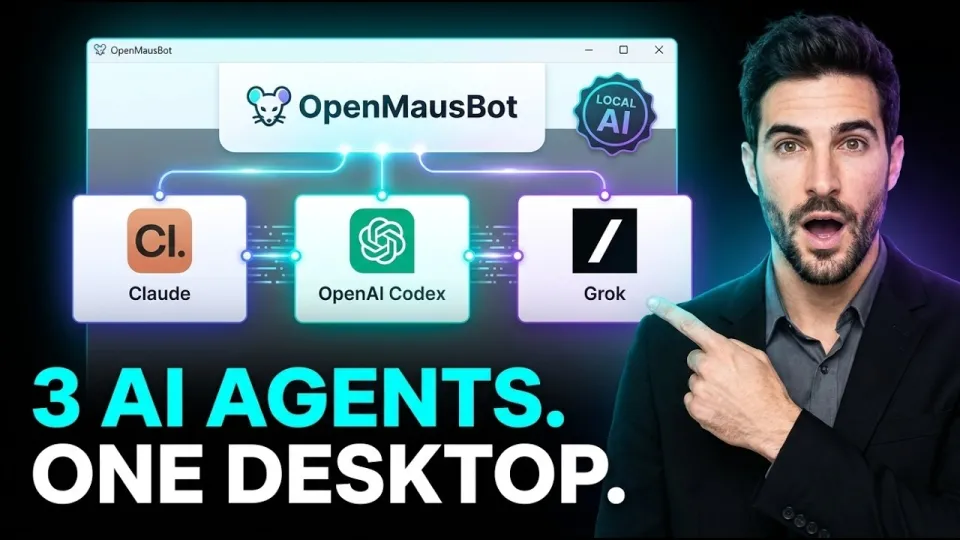
Video: OpenMausBot: Running Claude, Codex & Grok Locally in One Chat Roster
OpenMausBot is an open-source, local-first multi-agent desktop application that puts several AI coding assistants into a single chat roster instead of forcing you to juggle one chatbot at a time. It connects directly to the command-line tools already installed on your machine — Claude Code, Codex and Grok among them — and routes everything through a harness server bound to 127.0.0.1. The code is published under the Apache 2.0 license, and you can review it or clone it from the OpenMausBot GitHub repository.
Why a single chatbot is the wrong model for agent work
One assistant in one box breaks down as soon as tasks need different strengths, parallel exploration or independent review. OpenMausBot treats AI coordination as a collaborative messaging platform: each agent is a participant in a shared conversation space rather than a monolithic assistant you keep re-prompting.
The practical consequences are concrete:
- Specialization by engine. A planning pass can go to one model, a refactor to another, and a quick shell investigation to a third, all inside the same thread.
- Bring your own agents (BYOA). The app does not ship its own inference backend. It drives the CLI engines you already have installed and authenticated, so your existing subscriptions and quotas apply.
- No proxy markup. Because requests go from your machine to the vendors' own CLIs, there is no third-party cloud proxy sitting in the middle and no subscription resale layer.
- Shared context. All participants see the same conversation, so handoffs do not require copy-pasting transcripts between browser tabs.
Bring your own agents and local CLI engines
OpenMausBot's driver abstraction layer is what makes the roster possible: each supported engine is wrapped by a driver that translates the app's internal message format into that tool's command-line interface. Claude Code, Codex and Grok are the headline integrations, and the abstraction is designed so additional CLI engines can be added without rewriting the chat layer.
This matters for data sovereignty. The harness server listens strictly on the loopback address 127.0.0.1, so it is not reachable from the local network or the internet by default. Transcripts, sensitive API keys and event streams are persisted on your own disk in the `~/.openmausbot` directory rather than in a vendor cloud. If you already pay for a coding assistant subscription, the app reuses that access instead of asking you to buy a second, marked-up plan.
Two-process architecture and the event bus
The application runs as two cooperating processes: an Electron shell for the interface and an internal harness server that does the orchestration work. The shell never talks to the model vendors directly — it talks to the harness on 127.0.0.1, and the harness talks to the CLI engines.
Communication between the two is built on a canonical event bus that emits SSE (Server-Sent Events) and NDJSON (newline-delimited JSON). Every agent action, tool call, token stream and status change becomes an event on that bus, which gives the UI live updates and gives scripts a stable machine-readable format to consume. Because the bus is canonical, a headless run and an interactive session observe exactly the same events, which is what makes automation reproducible.
Agents with hands: cloud desktop previews and interactive takeover
Agents in OpenMausBot are not limited to producing text; they can operate a sandboxed cloud desktop to inspect and manipulate a running application. The preview is isolated from the host machine, so exploratory clicking and rendering checks do not touch your real environment.
When the agent gets stuck — a login wall, an ambiguous UI state, a captcha — interactive takeover lets the human grab control of the same sandboxed desktop, resolve the blocker, and hand it back. The agent then continues from the state the human left behind, with the whole exchange recorded on the event bus.
The Permission Broker and human-in-the-loop approvals
Shell commands and file writes are gated by a Permission Broker that surfaces Allow/Deny decision cards before an action executes. This is the difference between an agent that can act and an agent that can act safely: the capability is there, but every consequential step passes through an explicit human decision.
The approval flow is deliberately simple:
- The agent requests an action (run a command, modify a file, reach an integration).
- The broker renders a decision card describing exactly what will happen.
- You choose Allow or Deny; denials are fed back to the agent as a result rather than silently dropped.
- The decision and its outcome are written to the local event log for later audit.
Headless orchestration with team.yaml and MCP support
Beyond the desktop UI, OpenMausBot can run workspaces headlessly, driven by a `team.yaml` file that declares which agents participate, what roles they play and how the workflow proceeds. The same roster you configure interactively can therefore be executed from a script or CI job, emitting the same SSE/NDJSON events for downstream tooling.
For editor-centric workflows, the app supports stdio MCP (Model Context Protocol) servers, so Claude Desktop and Cursor can connect to the same agent roster over standard input/output. Composio app marketplace integrations extend the roster's reach into external services, letting agents act on connected apps under the same Permission Broker rules. Documentation and release builds are published at openmausbot.com.
Official links and project resources
- OpenMausBot source code and issue tracker: https://github.com/milind-soni/OpenMausBot
- Official documentation and releases: https://openmausbot.com
- License: Apache License 2.0
Technical evaluation and data sovereignty
OpenMausBot's core argument is architectural rather than cosmetic: multi-agent coordination belongs in a messaging layer on your own machine, not in a rented cloud proxy. The loopback-only harness, the `~/.openmausbot` storage path and the Permission Broker together mean that keys, transcripts and command approvals never leave the workstation by default, while the driver abstraction keeps the roster open to whatever CLI engines you already trust. The trade-offs are equally clear — you manage the underlying tools and their authentication yourself, and the human-in-the-loop cards add friction precisely where friction is warranted. For teams that want Claude, Codex and Grok working in one place without surrendering control of their data, the model is worth testing; start by cloning the project from https://github.com/milind-soni/OpenMausBot and reading the docs before wiring it into a real repository. This breakdown was produced by the Zero2GeniusAI channel.
Key takeaways
- OpenMausBot (also called MausBot, formerly OpenGrokBot) is an Apache 2.0 open-source desktop app that coordinates multiple AI agents in one chat roster.
- It drives the CLI tools already installed on the workstation, including Claude Code, Codex and Grok, instead of reselling cloud API access.
- An Electron shell talks to an internal harness server bound strictly to 127.0.0.1, with transcripts, keys and event streams stored in ~/.openmausbot.
- A Permission Broker shows Allow/Deny cards before any shell command or file write, keeping a human in the loop.
- Headless orchestration is driven by a team.yaml file, and stdio MCP servers connect Claude Desktop and Cursor to the same agents.
Source: OpenMausBot: Running Claude, Codex & Grok Locally in One Chat Roster · Markdown version
Questions & answers
Does OpenMausBot require separate API keys or a subscription?
No separate proxy subscription is needed. OpenMausBot drives the CLI tools you already have installed and authenticated, such as Claude Code, Codex and Grok, so your existing access and quotas apply. Keys and transcripts stay on your disk in ~/.openmausbot.
Is OpenMausBot safe to run on a work machine?
The internal harness server binds strictly to 127.0.0.1, so it is not exposed to the network, and data is stored locally. Shell commands and file writes pass through a Permission Broker that requires an explicit Allow or Deny decision before execution.
Can OpenMausBot run without the desktop interface?
Yes. Workspaces can be orchestrated headlessly using a team.yaml file that declares the agents and their roles. Headless runs emit the same SSE/NDJSON events as the interactive app, so scripts and CI jobs can consume them.
How do Claude Desktop and Cursor connect to the same agents?
OpenMausBot supports stdio MCP servers, which lets Claude Desktop and Cursor attach to the agent roster over standard input/output. Composio marketplace integrations then extend what those agents can do in external apps, still under Permission Broker approval.